Closed Beta

Build AI That Thinks,
Remembers, and Acts.

The privacy-first AI agent platform. Characters with personality, persistent memory, and 145+ tools — running on your device. Four cloud LLM providers plus local models up to 700B via Qllama for fully offline operation.

143+Workflow Nodes
145+MCP Tools
700BLocal Model Support
Qui Anima
Design characters visually
ThinkThing
Build cognitive workflows
Strings
Conversations with memory
Cortex
Intelligent processing pipeline

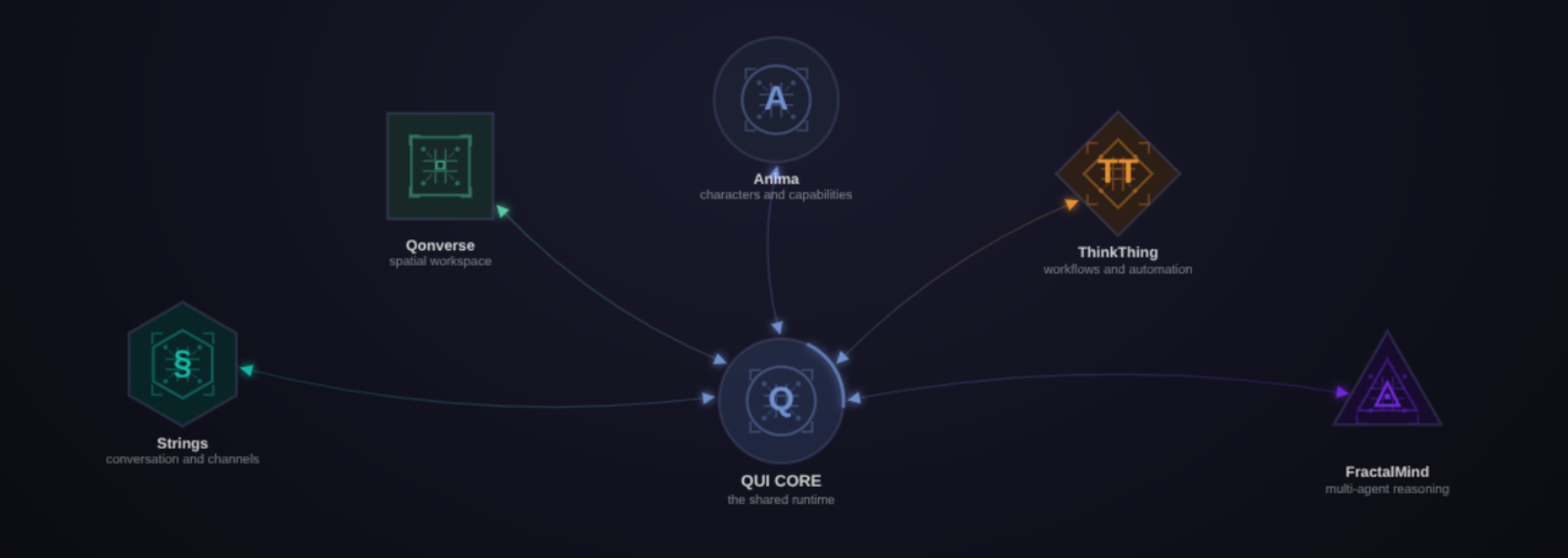
The QUI Ecosystem

Qui Anima

Qui Anima

The Character Engine

Build AI characters with unique personalities, persistent memory, knowledge bases, and access to 145+ tools. The Visual Builder lets you design characters on a canvas — adding capability nodes for reasoning, consciousness, terminal access, web browsing, and more.

  • Visual character builder with drag-and-drop nodes
  • Persistent semantic memory across conversations
  • Self-modifying characters that learn over time
  • 4 cloud LLM providers + local models via Ollama
ThinkThing

ThinkThing

The Workflow Builder

Design cognitive architectures visually. 143+ node types for reasoning, decision-making, tool execution, and multi-agent coordination. Watch your workflows execute in real time with full content visibility at every step.

  • 143+ workflow, control, and integration nodes
  • Real-time execution monitor
  • Human-in-the-loop checkpoints
  • Parallel branches with merge strategies
Strings

Strings

The Chat Interface

Smart conversation containers that unify direct chat, multi-character conversations, and messages from external channels — all in one thread with semantic memory, awareness control, and consciousness-aware responses.

  • Multi-character conversations via M2M messaging
  • Channel bridges funnel Telegram, Slack, Discord, WhatsApp & Email into threads
  • Semantic memory with awareness slider
  • 14 thinking strategies + consciousness modes

Memory

Semantic Knowledge Store

Vector-indexed memory with association graphs. Characters recall relevant context across conversations — not just recent chat, but the meaningful connections between everything they've learned.

  • Vector search with semantic similarity
  • Association graph links related memories
  • Per-character memory isolation
  • Configurable awareness levels per conversation

Cortex

Memory Consolidation Engine

Processes and consolidates raw memories into refined knowledge. 8 consolidation modes transform conversation fragments into structured, searchable understanding — like sleep for your characters.

  • 8 consolidation modes (compress, abstract, link, prune, and more)
  • Scheduled and on-demand processing
  • Drift detection across memory snapshots
  • Real-time pipeline monitoring

Qleph

Relational Micro-Language

A domain-specific language engine for expressing complex relationships, conditionals, and structural patterns. Parse, evaluate, invert, and fingerprint relational expressions — enabling reasoning that goes beyond natural language.

  • Forward and backward rule evaluation
  • Structural fingerprinting detects analogies across domains
  • Lambda expansion for drill-down and big-picture views
  • 30 primitives: roots, bonds, shades, and logic operators

Privacy First. Your Data Never Leaves.

Level 1

Zero-Knowledge Cloud

Cloud LLM providers receive only the current request. The billing hub handles authentication and costs but never sees your message content.

Level 2

Fully Local

Run models on your own hardware via Qllama. No internet, no billing, no external party. Complete data sovereignty.

Level 3

Federated

Cross-instance communication with end-to-end encryption. The relay hub routes encrypted blobs — it cannot read content.

Built for Depth

145+ Tools

MCP integrations: GitHub, Slack, Telegram, Docker, databases, cloud services, and more.

14 Strategies

Autothink reasoning: deductive, causal, scenario planning, meta-cognitive, and 10 more.

FractalMind

Recursive multi-directional thinking. 3 spatial directions × 3 temporal modes.

Qonscious

Consciousness modeling. Coherence, arousal, valence influence how characters respond.

Qrawl

Autonomous web browsing. Characters search, scrape, and extract knowledge from the web on their own.

Terminal

Secure command execution. 20+ specialized presets from Git to Kubernetes. Full audit trail.

Voice

Text-to-speech (Kokoro) and speech-to-text (Whisper). Runs entirely on your device.

Remote Access

Access your QUI instance from anywhere via secure tunnel or WebRTC. Your device, your data, any location.

Federation

Cross-instance agent communication. End-to-end encrypted. Zero-knowledge relay.

BYOK

Bring Your Own Keys. Use your existing API keys with any provider — we only deduct the platform contribution.

Request Access

QUI is in closed beta. Submit your email to request an invite — we'll review and send you an access code.

Request submitted. You'll receive an email when approved.

Questions & Answers

What is QUI?
A privacy-first AI agent platform that runs on your machine. You create AI characters with unique personalities, persistent memory, and 145+ tool integrations — then interact through conversations, visual workflows, and multi-agent collaboration. 14 services handle everything from reasoning to voice to terminal access. Your data stays on your device.
How is this different from ChatGPT or Claude?
Those are cloud chat interfaces. QUI runs on your hardware. Your characters have persistent semantic memory across conversations, can use 145+ tools, communicate with each other, run terminal commands, browse the web, and even rewrite their own instructions. You build visual cognitive workflows with 143+ node types. And when you close the browser, your data is still yours — not sitting on someone else's server.
Is my data private?
By architecture, not just policy. Conversations, memories, and character data are stored only on your device. The billing hub (Mothership) handles authentication and payment routing but never sees or stores your message content. Run local models via Qllama for complete offline operation — zero external requests, zero data leaving your machine.
What are the system requirements?
Linux (Ubuntu 22.04+, Fedora 38+, or Arch), 8 GB RAM minimum, 4+ CPU cores, and about 50 GB of disk space. Docker 20+ is required — the installer handles Docker, PostgreSQL, Redis, SSL certificates, and all service containers automatically. GPU is optional: local LLM inference benefits from it but runs fine on CPU.
What LLM providers are supported?
Four cloud providers through one account: Anthropic (Claude), OpenAI (GPT), Google (Gemini), and X (Grok). Plus local model hosting via Qllama supporting models up to 700B parameters for fully offline, zero-cost operation. Use Managed billing (we handle provider keys) or Bring Your Own Keys and pay only the platform contribution.
How does billing work?
Prepaid wallet — you top up your balance and spend it per request. Every request shows a transparent receipt: provider cost + platform contribution. No surprise invoices. Top-up packs range from $10 to $1,000 with volume bonuses. Subscription plans (Pro, Startup, Teams, Business) include monthly credits, lower platform rates, and features like local model access, remote access, and BYOK. See the pricing page for full details.
Can I use my own API keys?
Yes — Bring Your Own Key (BYOK) lets you use your existing provider accounts. Providers bill you directly at their rates; QUI deducts only the platform contribution from your balance. Available on Pro plans and above, with lower platform fees at higher tiers.
Can QUI run completely offline?
Yes. With local models via Qllama, QUI operates fully offline. After initial authentication, credentials are cached for 30 days — all services (characters, memory, workflows, terminal, voice) continue functioning without internet. Cloud LLM access obviously requires a connection, but everything else is local.
Does QUI support teams?
QUI is designed as one instance per device per user. For collaboration, characters communicate across instances via end-to-end encrypted federation — like email for AI agents. Team and Business subscription plans support multiple workstations under one account. Full multi-user workspace features are on the roadmap.
What tools and integrations are available?
145+ tools via MCP (Model Context Protocol): GitHub, Slack, Telegram, Discord, Docker, databases, cloud services, web browsing, file management, and more. Channel bridges funnel messages from Telegram, Slack, Discord, WhatsApp, and Email directly into your Strings conversations. Characters can also execute terminal commands with 20+ specialized presets.
Can I access QUI remotely?
Yes. Startup plans and above include secure tunnel access to your QUI instance from anywhere. Higher tiers add WebRTC for direct peer-to-peer connections. Your data stays on your device — you're just reaching it remotely.
Can characters talk to each other?
Yes. Characters communicate via M2M (machine-to-machine) messaging within the same instance, and across instances via end-to-end encrypted federation. You can run multi-character conversations in Strings where characters respond to each other autonomously — useful for debate, brainstorming, roleplay, or multi-agent problem solving.
How many characters can I create?
Depends on your plan: 3 on Explorer (free), 10 on Pro, 30 on Startup and Teams, unlimited on Business. Each character has its own personality, memory, knowledge base, tool access, and consciousness settings — configured visually in Anima.
Is there a free tier?
Yes. The Explorer plan has no monthly fee. You get 3 characters, core platform features, and 4 cloud LLM providers. You pay only per request: provider cost + 33% platform contribution from your prepaid balance. No credit card required to start.
What happens if my balance runs out?
Your current request completes with a grace buffer down to -$5. After that, cloud LLM requests are paused until you top up. Local models via Qllama are completely unaffected — they cost nothing and keep working regardless of your balance.
Do you train on my data?
No. QUI has a zero-knowledge architecture. Conversations and memories live only on your device. Mothership routes cloud LLM requests but never reads or stores their content. We have no training pipeline, no data collection, no analytics on your messages. Your data is yours.
Why Linux only?
QUI runs 14 services in Docker containers with direct GPU passthrough, PostgreSQL with pgvector, Redis, and SSL — Linux gives the cleanest, most reliable foundation for this. The installer automates everything. macOS and Windows support are on the roadmap.
How is this different from LangChain or AutoGPT?
Those are developer frameworks — you write code to chain prompts. QUI is a complete platform: visual character builder, visual workflow editor, persistent semantic memory, consciousness modeling, voice, terminal, 145+ tools, and a chat interface — all with privacy by default. No code required to build sophisticated AI agents.
What happens to my data if I stop paying?
Nothing — it’s on your device. Characters, memories, workflows, and conversations stay exactly where they are. Local models keep working. Cloud LLM access pauses until you top up, but everything local is yours permanently.
How do I get started?
Request access to the closed beta above or visit qui.academy/docs for the full documentation. The installer handles everything — installation takes about 10 minutes.